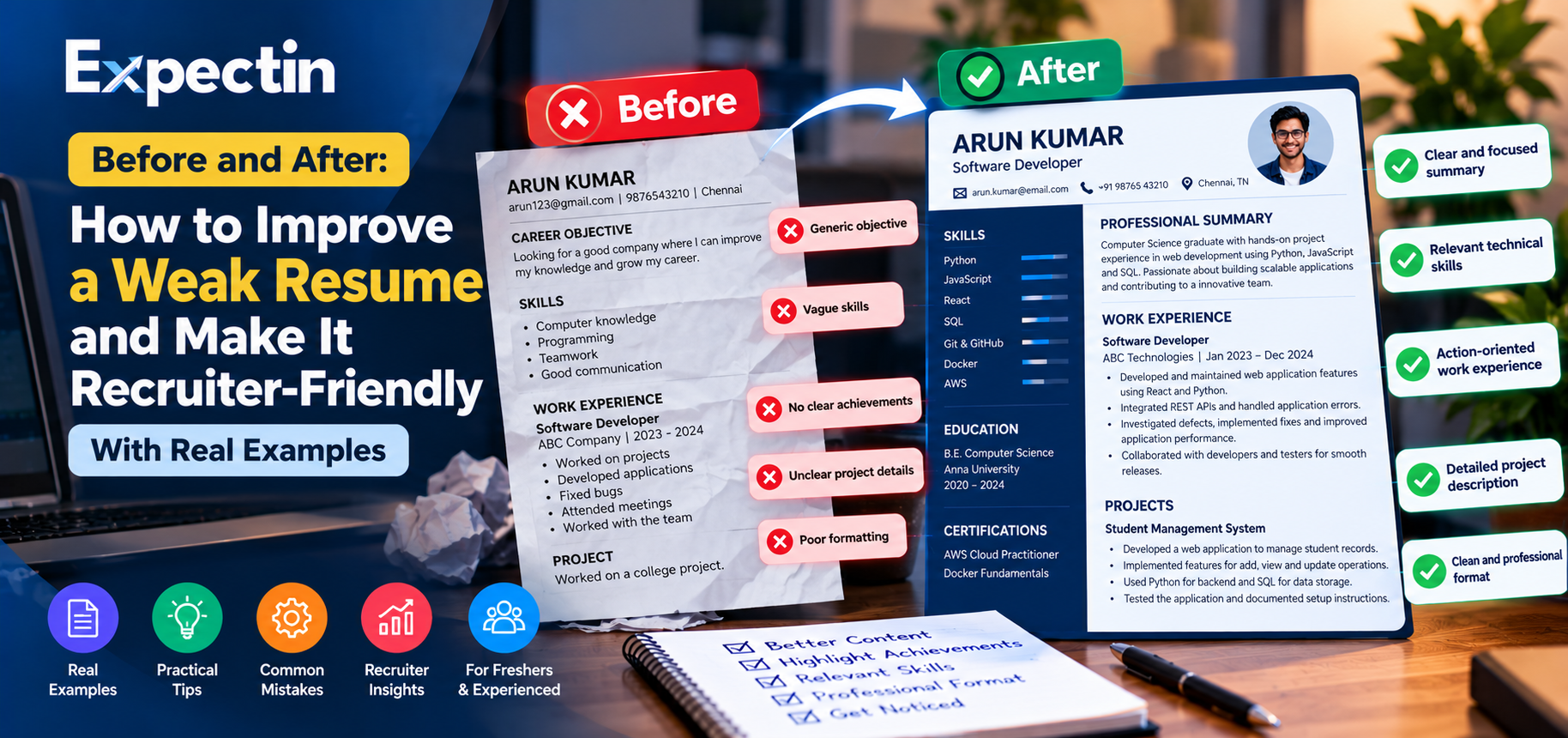
Before and After: How to Improve a Weak Resume and Make It Recruiter-Friendly
A resume is more than a list of qualifications and previous jobs. It is a short professional document that helps recruiters understand your skills, experience, and suitability for a particular position.
Many candidates have valuable skills but struggle to present them clearly. Generic descriptions, irrelevant information, inconsistent formatting, and unsupported claims can make it difficult for recruiters to understand their strengths.
The solution is not to make your resume longer or fill it with complicated words. It is to make the information clearer, more relevant, and easier to evaluate.
In this Expectin guide, we use fictional examples to demonstrate how a weak resume can be improved for different career situations.
Example 1: Improving a Fresher's Resume
Imagine a recent graduate applying for a Junior Software Developer position.
Before: Weak resume content
Career Objective
Looking for a good company where I can improve my knowledge and grow my career. I am hardworking and willing to learn new technologies.
Skills
Computer knowledge
Programming
Communication
Teamwork
Project
Worked on a college project.
Why does this need improvement?
The content is too general. It does not identify the candidate's actual programming languages, project purpose, responsibilities, or technical contribution.
A recruiter cannot easily determine whether the candidate has relevant skills for the vacancy.
After: Improved resume content
Professional Summary
Computer Science graduate with academic project experience in web development using Python, JavaScript, and SQL. Interested in developing reliable applications, learning software engineering practices, and contributing to a development team.
Technical Skills
Programming: Python, JavaScript
Web Development: HTML, CSS
Database: SQL
Tools: Git and GitHub, if used
Academic Project: Student Management System
Developed a web application to manage student records.
Implemented features for adding, viewing, and updating student information.
Used Python for application logic and SQL for data storage.
Tested the main workflows and documented the project setup.
These example statements should be adapted to match the candidate's actual project and skills.
Why is this version better?
It identifies relevant technologies, explains the project, and gives recruiters a clearer understanding of the candidate's practical exposure.
Example 2: Improving an Experienced Developer's Resume
Consider a developer with professional experience applying for another software development role.
Before: Weak resume content
Software Developer
Worked on projects.
Developed applications.
Fixed bugs.
Attended meetings.
Worked with the team.
After: Improved resume content
Software Developer | Example Technologies
Developed and maintained web application features using the technologies required by the project.
Integrated REST APIs and handled application errors.
Investigated software defects and implemented fixes.
Collaborated with developers and testers to validate releases.
Documented technical changes and supported application maintenance.
Why is this version better?
The revised version explains the candidate's responsibilities in a more specific way.
For an even stronger resume, the candidate can include verified achievements, such as a measurable reduction in processing time, improved test coverage, or a documented performance improvement.
Do not add numerical results unless they are accurate and can be explained during an interview.
Example 3: Improving a DevOps Resume
DevOps candidates sometimes list tools without explaining how they used them.
Before: Weak resume content
Skills: AWS, Docker, Linux, Kubernetes, Jenkins, Python.
Experience: Worked on cloud and deployment activities.
After: Improved resume content
Technical Skills
Operating Systems: Linux
Containers: Docker
Cloud: AWS services used in actual projects
CI/CD: Jenkins or GitHub Actions, if applicable
Scripting: Python or Bash
Relevant Experience or Project Work
Created Docker images for a test application.
Configured a CI/CD pipeline to automate build and test steps.
Deployed an application to a test cloud environment.
Used logs and monitoring metrics to investigate application issues.
Documented deployment steps and environment configuration.
Why is this version better?
It connects tools with actual activities. Recruiters can see how the candidate has applied technical knowledge instead of reading only a list of keywords.
Candidates should clearly distinguish professional responsibilities from personal or academic projects.
Example 4: Improving a Career Change Resume
Candidates moving from technical support, testing, or another field into software development or DevOps may worry that their previous experience is irrelevant.
Instead of hiding previous work, highlight transferable skills and demonstrate newly acquired technical abilities.
Before: Weak resume content
Seeking a career change into IT. Willing to learn anything and work hard.
After: Improved resume content
Professional Summary
IT support professional transitioning toward cloud operations, with experience troubleshooting technical issues, documenting incidents, and supporting users. Developing practical skills in Linux, cloud infrastructure, and automation through hands-on projects.
Relevant Transferable Skills
Technical troubleshooting
Incident documentation
Root-cause investigation, where applicable
User and team communication
Process documentation
Technical Projects
Include genuine projects demonstrating the technical skills required by your target role.
Why is this version better?
It explains the candidate's previous strengths and the connection to the new career direction without pretending that the candidate already has professional experience in the new field.
Example 5: Improving the Skills Section
A skills section should be relevant to the vacancy and easy to scan.
Before
Skills:
Hardworking
Honest
Computer skills
Leadership
Internet knowledge
All programming languages
After
Technical Skills
Programming: Python, JavaScript
Databases: PostgreSQL, MySQL
Tools: Git, GitHub
Web Development: React, REST APIs
Professional Skills
Problem-solving
Technical documentation
Team collaboration
Only list tools and skills that you can explain confidently. Replace the example technologies with those you actually know.
Avoid statements such as "all programming languages." They are too broad to communicate a meaningful level of expertise.
Example 6: Improving the Resume Summary
The summary should briefly introduce your background and the skills most relevant to the role.
Before
I am a very hardworking and enthusiastic person looking for a challenging job in a reputed company where I can utilize my skills.
After: Fresher
Computer Science graduate with project experience in Python, SQL, and web development. Interested in building software applications and applying programming skills to real-world problems.
After: Experienced Professional
Software Developer with experience building and maintaining web applications, integrating APIs, and troubleshooting application issues. Interested in developing reliable software and contributing to collaborative engineering teams.
The improved summaries provide useful professional information without unnecessary claims.
Example 7: Improving Resume Formatting
Even strong content can become difficult to read when the formatting is inconsistent.
Common formatting problems include:
Different font sizes used without a clear reason
Long paragraphs instead of concise bullet points
Inconsistent date formats
Excessive colors and decorative elements
Unnecessary personal information
Important skills buried at the bottom
Spelling and grammatical errors
A cleaner resume generally includes:
Contact information and professional links
A concise professional summary, when useful
Technical or role-relevant skills
Work experience or relevant projects
Education
Certifications, where relevant
The best order depends on your experience and the job you are applying for.
Use readable fonts, consistent spacing, clear headings, and a layout that works well on a mobile screen and in common document viewers.
How to Make Your Resume Relevant to Each Job
A resume should reflect the requirements of the position you are applying for.
Before submitting your application:
Read the job description. Identify the required skills, responsibilities, experience level, and qualifications.
Prioritize relevant experience. Put the most useful skills and accomplishments where recruiters can find them easily.
Use accurate terminology. Include relevant technical terms when they genuinely describe your experience.
Remove unrelated details. Keep the document focused on information that helps evaluate your suitability.
Check every claim. Be prepared to explain each listed skill, project, and achievement.
You do not need to invent experience or repeat every keyword from the job description. A truthful, targeted resume is more useful than a keyword-filled document that misrepresents your abilities.
How Can an ATS-Friendly Resume Help?
Applicant Tracking Systems (ATS) are used by some employers to manage and organize applications. The features and screening processes differ between systems and employers.
To improve readability and compatibility:
Use standard section headings.
Keep important information in selectable text rather than images.
Use a simple, consistent layout.
Clearly label work experience, education, and skills.
Follow the employer's requested file format.
Avoid placing essential details only in complex tables, graphics, or headers.
Check that your contact information and dates remain readable after exporting to PDF.
No formatting technique guarantees that a resume will pass every ATS or lead to an interview. Employers use different systems and selection criteria.
Resume Improvement Checklist
Before submitting your resume, check the following:
Does the summary match the role?
Are your skills relevant and accurate?
Do your experience bullet points explain what you did?
Are your projects described clearly?
Are achievements supported by evidence?
Is the formatting consistent?
Have you removed unnecessary repetition?
Is the document free of spelling mistakes?
Can you explain every claim in an interview?
Does the resume follow the employer's application instructions?
Reviewing these points can help you identify improvements before sending your application.
Frequently Asked Questions
Should I use the same resume for every job?
Keep a master resume, but adjust the emphasis and ordering of relevant skills and experience for each suitable vacancy. Keep all details truthful.
Can a fresher create a strong resume without work experience?
Yes. Freshers can showcase academic projects, internships, relevant coursework, certifications, and practical projects. Clearly label the type of experience.
Is a two-page resume acceptable?
It depends on your experience and the position. A concise one-page resume can work well for many freshers, while experienced professionals may need more space for relevant accomplishments.
Should I include every technology I have studied?
Include skills relevant to your target roles and be clear about your actual proficiency. You do not need to list every technology you have encountered.
Will an ATS score guarantee an interview?
No. An ATS score or resume analysis tool can help identify potential improvements, but it cannot guarantee that an employer will shortlist you. Selection also depends on qualifications, experience, hiring criteria, and competition.
Improve Your Resume and Explore Opportunities on Expectin
A good resume helps employers understand your real skills and experience. Start by improving clarity, adding relevant details, and removing vague or unsupported statements.
Visit https://expectin.com to explore job opportunities and review the requirements of positions that match your background.
Tailor your resume honestly to each suitable vacancy and continue improving it as you gain new skills and experience.
About Expectin
Expectin helps job seekers explore career opportunities and access career-related resources. Use these practical examples to improve how you present your experience and prepare for your next application.